Digital Boarding Passes Basics
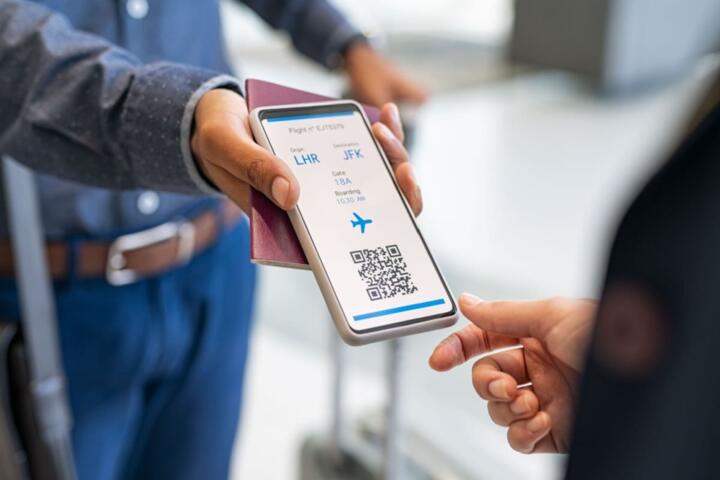
Airports increasingly adopt fully digital boarding passes, meaning travelers no longer need paper prints for check-in or gate access. Instead, smartphones or wearable devices display QR codes or barcodes scanned by airline or airport staff. For example, as of 2023, American Airlines supports digital boarding passes via its app, accessible offline to prevent connectivity issues.
Practical use includes scanning at security and boarding gates, sometimes combined with biometric verification. A 2022 SITA report found over 70% of global passengers used mobile boarding passes, up from 50% just two years earlier. Smaller regional airports also join the trend, cutting costs for printing and manual document handling.
Common Challenges
Assuming digital boarding passes always work causes frustration. Some passengers neglect app updates, leading to invalid QR codes at gateways. Others depend solely on their phone’s battery; dead devices can cause delays or missed flights. This problem occurs often during long layovers without access to charging stations.
Relying only on digital boarding passes also exposes airports to technical failures; Wi-Fi outages or scanner glitches can halt boarding. Besides inconvenience, non-functional scans may create security gaps if staff bypass checks. Digital literacy varies widely, with some travelers struggling to locate or retrieve passes on unfamiliar apps.
Plus, inconsistent adoption between airports and airlines creates confusion. A traveler might need a paper pass at one location but digital only at another. These mismatches increase wait times and reduce traveler confidence. The consequences range from missed flights to increased operational costs for manual verifications.
Approaches to Go Digital
Use Airline Apps Proactively
Install your airline’s official app before travel. It stores boarding passes securely and sends timely gate updates. Airlines like Delta and Lufthansa send push notifications with updated boarding info to keep passengers current. The upfront effort prevents last-minute scramble at the gate.
Download Boarding Passes for Offline Use
Save passes into device wallets or PDF files. This works when cellular or airport Wi-Fi is weak or unavailable during transit. Some apps like United’s version 9.7 explicitly support offline boarding pass access, avoiding scanning failures caused by network issues.
Carry a Power Bank
Charging on the go makes a difference. Lightweight power banks that fit in pockets or carry-ons keep devices alive during long waits or delays. You avoid the stress of turning your phone off to preserve battery—common but counterproductive behavior when a digital pass is your only boarding option.
Familiarize with Airport Tech
Observe how boarding passes are scanned at different airports. Some use handheld scanners; others rely on fixed gates or facial recognition tied to the digital pass. Understanding these reduces surprises and speeds boarding as you know when to prep your phone. For instance, Singapore Changi Airport uses facial authentication integrated with mobile passes.
Prepare Backup Options
Always request a printed pass if your phone is old, or connectivity is highly uncertain. Some airlines still offer this on-demand—American Airlines does at kiosks. Having a backup can prevent being stranded or forced to recheck bags if a digital pass doesn’t scan properly.
Enable Notifications and Alerts
Set push alerts from airline apps and your phone’s calendar. Some apps, like British Airways’, offer gate change alerts integrated with boarding passes. These alerts reduce time wasted in lines and prevent missing last calls even when your phone is locked or screen dims.
Practice Scan Simulations
Test your digital boarding pass on your device using QR scanner apps before heading to the airport. This checks whether the code is readable and not corrupted. I did this last year with the Delta app before an international trip; it saved me from scanning headaches at JFK Airport.
Use Mobile Wallets Smartly
Adding boarding passes to Apple Wallet or Google Pay centralizes documents and enhances accessibility. Wallets often cache passes automatically and show them on lock screens near boarding times. This method reduces the steps needed to locate the pass amid other apps.
Train Staff on Digital Workflows
Airports must train gate agents with emphasis on digital-only boarding scenarios. Mistakes by poorly informed staff cause delays or force manual overrides. Airlines like Emirates provide extensive staff training focusing on technology updates and troubleshooting common customer issues.
Examples from Industry
At Zurich Airport, the switch to digital passes cut boarding times by 20% during peak summer months in 2023. The airport integrated multiple airlines into a single app platform and equipped gates with advanced QR scanners, handling over 44 million passengers annually.
On the other hand, Ryanair faced backlash in 2022 when its mobile app glitch prevented digital pass retrieval for thousands during holiday season. Recovery involved print kiosks and customer service lines handling 30% more calls than usual. That disruption illustrates the risk of relying too heavily on digital solutions without fallback processes.
Roadmap for Airports
| Step | Action | Effect | Example |
|---|---|---|---|
| 1 | Integrate multi-airline apps | Unified passenger experience | Zurich Airport platform |
| 2 | Upgrade scanning hardware | Reduces boarding delays | QR handheld scanners |
| 3 | Provide print fallback options | Covers tech failures | American Airlines kiosks |
| 4 | Train staff on new workflows | Minimizes human error | Emirates training program |
| 5 | Educate passengers pre-trip | Reduces confusion | Airport websites and emails |
Errors to Dodge
Trying to scan a boarding pass on cracked screens often fails—test before travel or else expect hassle. Don’t ignore app updates; outdated versions might generate invalid QR codes, causing needless stress. Forgetting to charge your phone before arrival is a common blunder; even a 20% battery can save you if used wisely.
Turning off roaming to avoid charges and killing the app can block access to your pass offline access, ironically increasing risk. Expect delays if your boarding pass is behind layers in your device—make it accessible from a lock screen or widget.
Assuming airport Wi-Fi will always work is optimistic—download passes in advance. Missing backup printouts at smaller airports still relying on paper is a rookie move. Each slip adds five minutes or more to boarding.
FAQ
Can I use digital boarding passes offline?
Most airline apps and wallet passes work offline Once downloaded, QR codes remain readable without internet, preventing connectivity blocked boarding.
What if my phone battery dies?
You’ll need a printed boarding pass or a way to borrow a charged device at the airport. Some airlines offer kiosks for printing if you can't access your digital pass.
Are digital passes accepted at all airports?
Not all airports fully support digital passes yet. Check your departure and arrival airports' policies in advance; some may still require paper or printed versions.
How secure are digital boarding passes?
Digital passes use encrypted QR codes. Combining them with biometric checks enhances security, but screen visibility risks others seeing your info in crowded gates.
Can I share a digital boarding pass with someone?
No, boarding passes are personal and non-transferable. Sharing may lead to denied boarding since identity checks link the pass to the passenger’s details.
Author's Insight
I've managed airport technology rollouts since 2017 and seen firsthand how digital boarding passes cut passenger stress when handled correctly. The tech isn’t perfect—failures happen if you rely on it blindly. Charge your phone, keep backups, and learn the app before arriving. That small effort saves hours later. It’s a mix of tech plus preparation, not one or the other.
Key Takeaways
Airports moving to digital boarding passes transform passenger flow and reduce waste. Travelers save time by downloading passes in advance, carrying power banks, and knowing airport scanning methods. Airports must support these changes with reliable tech, staff training, and printable backups. Mastering the details avoids boarding hiccups and smooths air travel from check-in to gate.